
Choosing between QuickBooks Online Accountant vs QuickBooks Online can be confusing because both products are part of the QuickBooks ecosystem, but they are designed for different users.
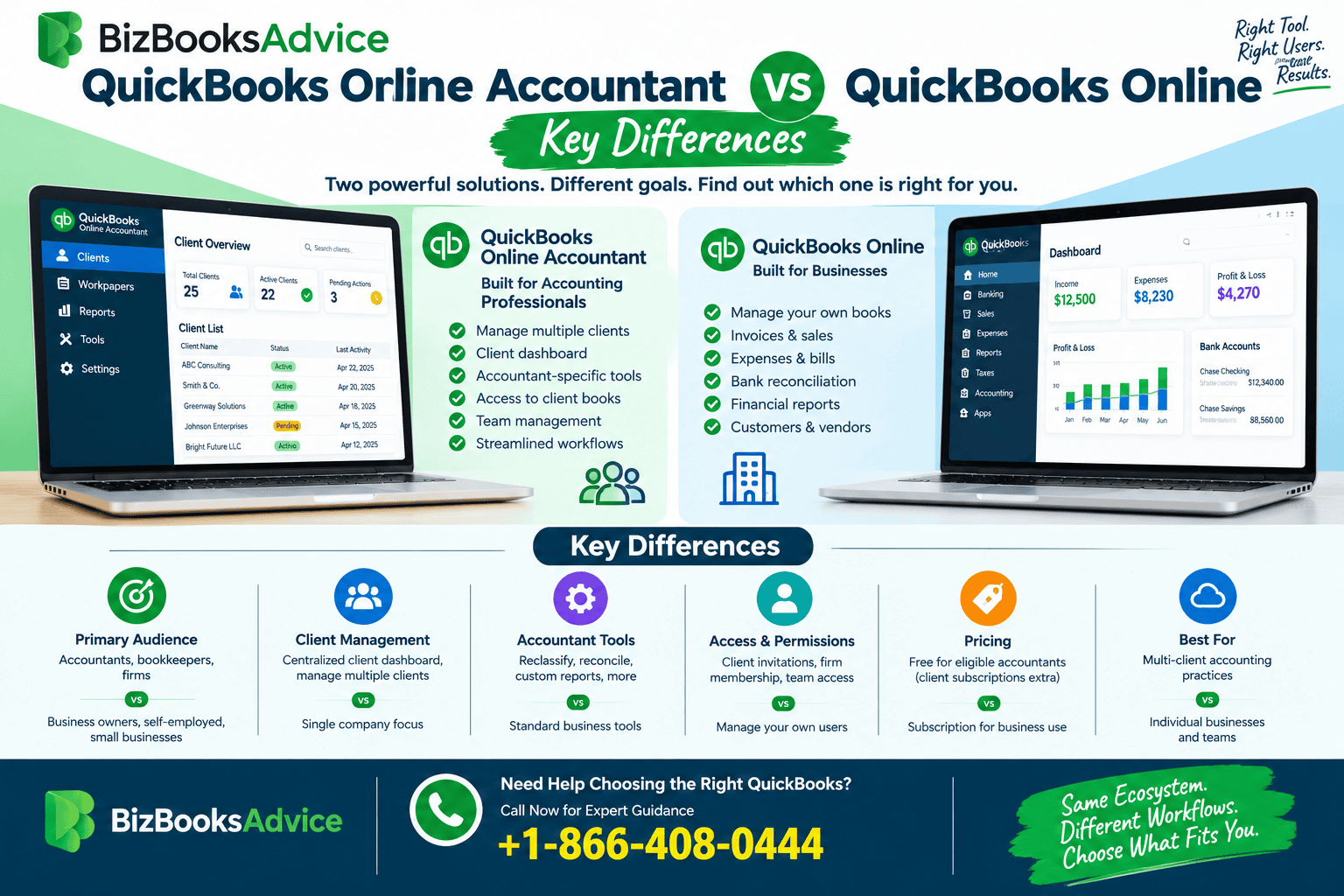
The simplest distinction is this: QuickBooks Online is primarily designed for businesses to manage their own accounting, while QuickBooks Online Accountant is designed for accountants, bookkeepers, and accounting firms that manage multiple clients. QuickBooks Online Accountant provides a centralized client dashboard and accountant-specific tools that aren't part of the standard business-user experience.
If you're an accountant working with several businesses, understanding this difference can help you choose the right workflow.
What Is QuickBooks Online?
QuickBooks Online is cloud-based accounting software designed primarily for businesses and their teams.
A business can use it to manage everyday accounting activities such as:
- Tracking income and expenses
- Creating invoices
- Managing bills
- Connecting bank accounts
- Recording transactions
- Running financial reports
- Managing customers and vendors
- Tracking business performance
The software is intended to give a business its own accounting environment where owners, employees, and authorized users can manage financial information.
QuickBooks Online can also connect with payroll, payments, time tracking, and third-party applications depending on the products and plan being used.
What Is QuickBooks Online Accountant?
QuickBooks Online Accountant is designed specifically for accounting professionals who work with QuickBooks clients.
Rather than focusing on one company's books, it provides an accountant-oriented environment where professionals can organize and access multiple client relationships from one login.
Intuit describes QuickBooks Online Accountant as a way for accountants to connect with clients, review their books, edit transactions, fix issues, and use enhanced bookkeeping tools.
The platform includes a client dashboard and accountant-specific tools that help firms work across multiple client accounts.
So, while the two products work together, their primary purposes are different.
QuickBooks Online Accountant vs QuickBooks Online: The Main Difference
The biggest difference is who the software is built for.
QuickBooks Online is primarily for a business managing its own financial records.
QuickBooks Online Accountant is primarily for an accounting professional managing financial records for multiple clients.
Think of it this way:
QuickBooks Online = manage your business's books.
QuickBooks Online Accountant = manage your accounting practice and work with your clients' books.
This distinction becomes especially important when an accountant starts working with multiple businesses.
QuickBooks Online Accountant vs QuickBooks Online for Client Management
Client management is one of the clearest differences.
A regular QuickBooks Online account is centered around the business using the account. The company manages its own customers, vendors, transactions, reports, and accounting activities.
QuickBooks Online Accountant, on the other hand, has a dedicated client-management workflow.
Accountants can maintain a client list, add or remove clients, update client information, and review connected client books. Intuit currently states that a QuickBooks Online Accountant firm can manage up to 2,000 clients in its client list.
For an accounting firm, having this centralized client environment can be much more practical than treating every client as an isolated login.
Can Accountants Access Multiple QuickBooks Online Clients?
Yes.
One of the major reasons accountants use QuickBooks Online Accountant is to access multiple client companies through the accountant environment.
After a client invites the accountant, the accountant can access the client's QuickBooks company and work with its transaction data. Intuit's current documentation explains that connected clients can be opened from the Client list, allowing accountants to review books, edit transactions, and fix accounting issues.
This makes multi-client accounting much more efficient.
Instead of repeatedly signing out of one business account and signing into another, the accountant can work from the central accountant environment.
QuickBooks Accountant vs Regular QuickBooks: Accountant Tools
Another important difference is access to specialized accountant tools.
Current Intuit documentation lists several accountant-specific capabilities, including:
- Reclassifying transactions
- Preparing accounts for taxes
- Writing off invoices
- Resetting reconciliations
- Customizing reporting options
- Accessing client dashboards
- Managing client workflows
These tools are specifically designed to make reviewing and adjusting client books more efficient.
For example, an accountant may need to reclassify multiple transactions during a bookkeeping review. An accountant-specific workflow can make that type of task much more practical than handling transactions one at a time.
QuickBooks Online vs QuickBooks Online Accountant:
Who Should Use Each?
QuickBooks Online Is Best For:
QuickBooks Online is generally appropriate for:
- Small business owners
- Entrepreneurs
- Self-employed professionals
- Company employees
- Business managers
- Internal bookkeeping teams
If you primarily need to manage your own company's accounting, regular QuickBooks Online may be the more appropriate environment.
QuickBooks Online Accountant Is Best For:
QuickBooks Online Accountant is designed for:
- Accountants
- Bookkeepers
- CPAs
- Accounting firms
- Tax professionals
- Professionals managing multiple QuickBooks clients
If your job involves maintaining books for several businesses, the accountant-focused platform is designed around that workflow.
How Client Access Works
The two products are also connected through accountant-client invitations.
A business using QuickBooks Online can invite its accountant to access the company's books.
Once the accountant accepts the invitation, the client company can appear in the accountant's client list.
Intuit's current instructions state that accountants can then open connected client companies from QuickBooks Online Accountant and return to their practice environment when they're finished working on the client's books.
This creates a clear separation between the client's accounting environment and the accountant's practice environment.
Does QuickBooks Online Accountant Replace QuickBooks Online?
No.
These products serve different purposes and are designed to work together.
An accounting firm may use QuickBooks Online Accountant as its accountant environment while its clients use their individual QuickBooks Online companies.
The accountant isn't necessarily replacing the client's QuickBooks Online subscription. Instead, the accountant is connecting to and working with the client's existing company.
This distinction is important for firms onboarding new clients.
QuickBooks Online Accountant and Your Own Firm's Books
There's another useful feature that accountants may overlook.
QuickBooks Online Accountant also provides a Your Books area for managing the accounting firm's own books.
According to current Intuit documentation, the Your Books section includes features based on QuickBooks Online Advanced for the firm's own accounting at no additional cost, although some Advanced capabilities aren't currently included.
This means an accounting firm can use the platform not only to work with clients but also to manage certain aspects of its own financial records.
That can make the accountant environment more than simply a client-access portal.
Reporting Differences
Both environments can provide financial reports, but the accountant's workflow is different.
With QuickBooks Online, the business generally creates reports to understand its own financial performance.
With QuickBooks Online Accountant, the accountant can work with reports across client engagements and use accountant-oriented reporting options.
Intuit also identifies reporting tools among its accountant-specific features, including options for setting default date ranges and filters for financial reports.
This can save time for professionals who perform similar reporting tasks across multiple clients.
QuickBooks Online Accountant and Transaction Reclassification
Transaction reclassification is another area where the accountant experience becomes valuable.
During a bookkeeping review, an accountant may discover that several transactions have been assigned to the wrong accounts.
Rather than correcting every transaction individually, the accountant tools can allow multiple transactions to be edited or moved at once. Intuit lists Reclassify transactions as one of the accountant-specific tools available to eligible accountant users.
This type of functionality is particularly relevant to professional bookkeeping workflows.
QuickBooks Online Accountant and Reconciliation Work
Accountants often need to investigate reconciliation issues when reviewing a client's books.
QuickBooks accountant tools include options for undoing or resetting reconciliations, depending on the current product experience.
Intuit specifically lists reconciliation tools among the accountant features designed to make client-book reviews more efficient.
For firms handling multiple monthly or year-end bookkeeping engagements, these tools can reduce repetitive work.
Is QuickBooks Online Accountant Free?
For eligible accountants, Intuit currently states that QuickBooks Online Accountant can be signed up for free for the accounting firm.
However, this does not mean that every client using QuickBooks Online is free.
Client subscriptions, products, billing arrangements, and applicable pricing are separate considerations.
Accountants should review the current QuickBooks pricing and billing terms before recommending a specific subscription to a client.
QuickBooks Online Accountant vs QuickBooks Online: Workflow Differences
The difference becomes even clearer when looking at a typical day.
Imagine a bookkeeper manages 25 businesses.
With regular QuickBooks Online accounts, the accountant needs access to each client's individual company.
With an accountant-oriented environment, the professional can use a centralized client list and move between connected client companies from the accountant workflow. Intuit specifically describes the platform as allowing accountants to manage multiple clients from one secure cloud-based platform.
That centralized workflow can make client management more scalable as a firm grows.
What About Security and Client Permissions?
Client access should always be handled carefully.
When an accountant connects to a client's QuickBooks Online company, access is based on the permissions and accountant relationship established between the client and the accounting firm.
Intuit's current documentation also notes that accountant users can access transaction data, while additional administrative responsibilities may require becoming the client's primary admin.
This distinction matters because an accountant shouldn't automatically assume that access to bookkeeping data means access to every administrative function.
QuickBooks Online Accountant vs QuickBooks Online for Growing Firms
For a solo business owner, QuickBooks Online may provide everything needed to manage the company's accounting.
But consider an accounting firm with 10, 50, or 100 clients.
The firm needs more than accounting software. It needs a way to:
- Organize clients
- Access client books
- Review transactions
- Manage bookkeeping workflows
- Perform accountant-specific adjustments
- Track client-related work
- Move efficiently between companies
That's where the accountant-focused environment becomes more useful.
Intuit positions QuickBooks Online Accountant as a platform for managing client work and accounting practice workflows rather than simply maintaining one company's books.
Which One Should You Choose?
The answer depends primarily on your role.
Choose QuickBooks Online if:
You are managing your own business accounting and don't need an accountant-focused multi-client environment.
Choose QuickBooks Online Accountant if:
You are an accountant, bookkeeper, CPA, or accounting firm managing multiple QuickBooks clients.
Use Both if:
You're an accounting professional whose clients maintain their own QuickBooks Online companies.
This is often the practical setup: clients maintain their business books in QuickBooks Online, while the accounting professional uses QuickBooks Online Accountant to manage the client relationship and access connected companies.
QuickBooks Online Accountant vs QuickBooks Online: Key Takeaways
The most important differences are simple:
- QuickBooks Online is primarily designed for individual businesses.
- QuickBooks Online Accountant is designed for accounting professionals.
- QuickBooks Online focuses on managing a company's own books.
- QuickBooks Online Accountant focuses on managing client relationships and accounting workflows.
- Accountant users get specialized tools for tasks such as reclassification and reconciliation.
- Accountants can access connected client companies through a centralized client list.
- Eligible accountants can sign up for QuickBooks Online Accountant for their firm at no charge, while client subscriptions are separate.
Frequently Asked Questions
What is the difference between QuickBooks Online Accountant and QuickBooks Online?
QuickBooks Online is primarily designed for businesses to manage their own accounting. QuickBooks Online Accountant is designed for accountants and bookkeepers who manage multiple client companies and need accountant-specific tools and centralized client access.
Is QuickBooks Online Accountant the same as QuickBooks Online?
No. They are related but serve different purposes. QuickBooks Online is the business accounting product, while QuickBooks Online Accountant is designed around professional accountant and multi-client workflows.
Can an accountant use QuickBooks Online without QuickBooks Online Accountant?
An accountant may access individual client companies through appropriate permissions, but QuickBooks Online Accountant provides a centralized accountant workflow and specialized tools specifically designed for working with clients.
Can QuickBooks Online Accountant manage multiple clients?
Yes. Managing multiple clients is one of its primary purposes. Accountants can use the client list to organize connected companies and access client books through the accountant environment.
Is QuickBooks Online Accountant free?
Intuit currently states that eligible accountants can sign up for QuickBooks Online Accountant for free. Client subscriptions and other products may have separate costs and billing arrangements.
Which is better for an accounting firm?
For an accounting firm managing multiple QuickBooks clients, QuickBooks Online Accountant is generally the more appropriate environment because it is specifically designed around client management and accountant workflows.
Final Thoughts
The difference between QuickBooks Online Accountant vs QuickBooks Online comes down to the type of work you're trying to accomplish.
If you're running a business and managing your own books, QuickBooks Online provides the accounting environment you need. If you're an accountant or bookkeeper responsible for multiple businesses, QuickBooks Online Accountant adds a client-focused workflow and specialized accountant tools that can make professional accounting work more efficient.
In other words, regular QuickBooks Online is centered on the business, while the accountant platform is centered on the accounting professional and their clients.
If you're setting up a client-based accounting workflow and need help choosing or configuring the appropriate QuickBooks environment, the BizBooksAdvice team can provide QuickBooks guidance at +1-866-408-0444.